
Add the IADS website shortcut on your mobile
Do you know you can easily access the IADS Website from your mobile phone, with just a little help from your thumb?
Put a shortcut on your home screen for convenience! Follow the 4 steps below and access valuable and exciting content:
> Go in your MOBILE WEB NAVIGATOR and then on the IADS WEBSITE (www.iads.org)
1. Click the MENU at the bottom of the page
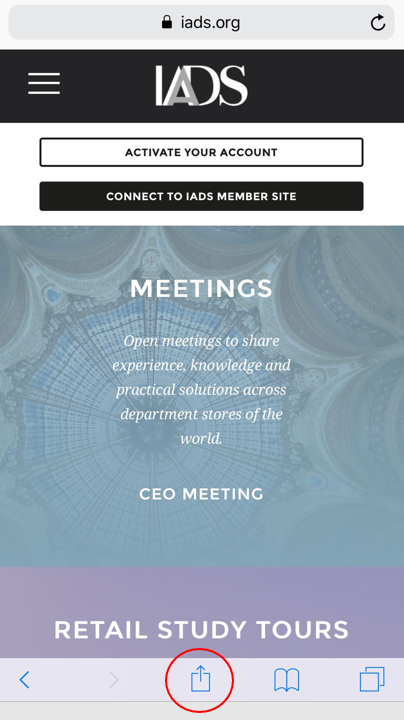
Illustration '2019 NEWS NOV Website shortcut on mobile HOMEPAGE' (png - 0.26Mo)

2. Choose ADD TO HOME SCREEN
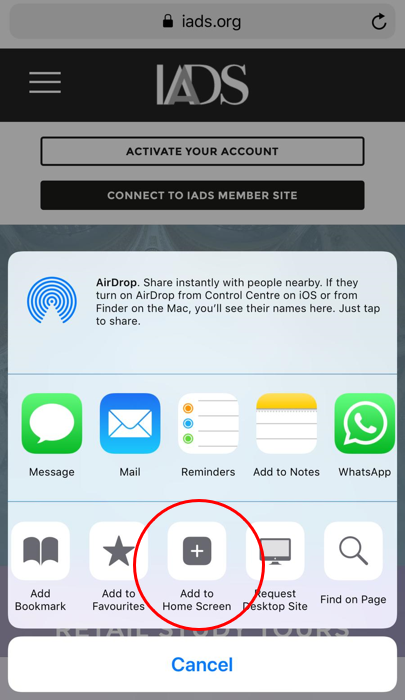
Illustration '2019 NEWS NOV Website shortcut on mobile MENU' (png - 0.16Mo)

3. RENAME your shortcut and ADD it
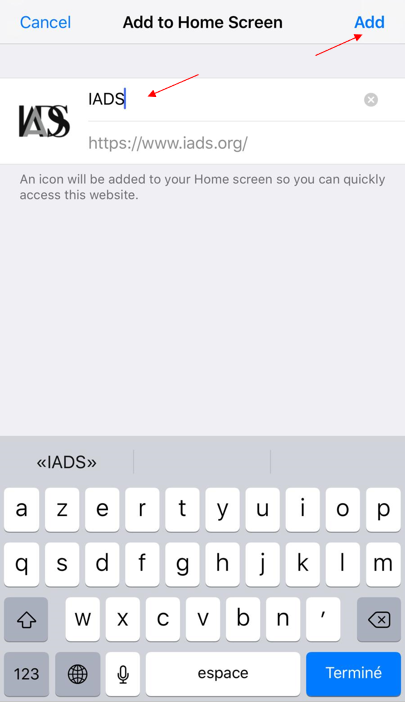
Illustration '2019 NEWS NOV Website shortcut on mobile TITLE' (png - 0.08Mo)

4. Find it on your mobile HOME SCREEN
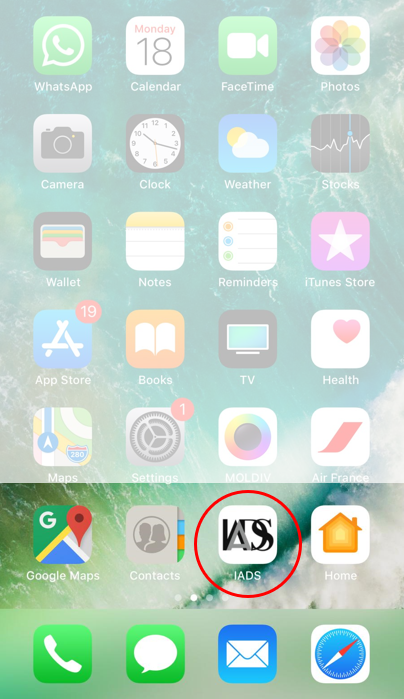
Illustration '2019 NEWS NOV Website shortcut on mobile DESK' (png - 0.43Mo)

Security
Unfortunatelly, it is impossible to save your password on the website for security reasons BUT you can save it in your mobile passwords menu.
Related posts

Shein shares plunge 14% to record low after profit slides
Shein shares plunge 14% to record low after profit slides
Heading 1
Heading 2
Heading 3
Heading 4
Heading 5
Heading 6
Lorem ipsum dolor sit amet, consectetur adipiscing elit, sed do eiusmod tempor incididunt ut labore et dolore magna aliqua. Ut enim ad minim veniam, quis nostrud exercitation ullamco laboris nisi ut aliquip ex ea commodo consequat. Duis aute irure dolor in reprehenderit in voluptate velit esse cillum dolore eu fugiat nulla pariatur.
Block quote
Ordered list
- Item 1
- Item 2
- Item 3
Unordered list
- Item A
- Item B
- Item C
Bold text
Emphasis
Superscript
Subscript

M&S and Sephora enter partnership to bring new beauty destination to the high street
M&S and Sephora enter partnership to bring new beauty destination to the high street
Heading 1
Heading 2
Heading 3
Heading 4
Heading 5
Heading 6
Lorem ipsum dolor sit amet, consectetur adipiscing elit, sed do eiusmod tempor incididunt ut labore et dolore magna aliqua. Ut enim ad minim veniam, quis nostrud exercitation ullamco laboris nisi ut aliquip ex ea commodo consequat. Duis aute irure dolor in reprehenderit in voluptate velit esse cillum dolore eu fugiat nulla pariatur.
Block quote
Ordered list
- Item 1
- Item 2
- Item 3
Unordered list
- Item A
- Item B
- Item C
Bold text
Emphasis
Superscript
Subscript